- Components of Webpage
Process:
Registration and Login
Users are able to register an account by inputting their desired login information in the registration form. This data that is inputted from the registration.html will be put inside the MySQL database table.
When the user inputs his/her Username and Password into the login form, PHP code will be used to sent the input to the MySQL database. This input will be matched against the data of registered users to check the validity of the login information. If such a match happens, the user will be brought to the homepage, where uploading and downloading of files are allowed. If not, the user will be returned to the login page.

Login and Registration Form
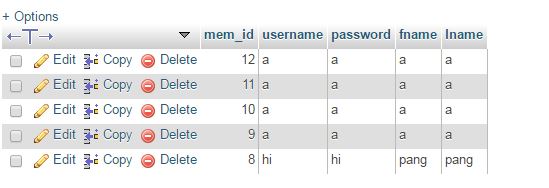
MySQL Database managed from phpMyAdmin
Upload
Users are allowed to upload their files by selecting a file from their device, whether mobile or with a computer. The upload code selects a file from the client-side device, placing it in the Apache server first as a temporary file. The code then proceeds to move the file from the temporary file into the directory of the Raspberry Pi. The file is saved with the same name as it has in the client-side device.
Download
 The users are able to download the files straight from the homepage with the click of a button. Users are able to download all files, in the same format as it was uploaded onto the server.
We wrote the download code from scratch. The code is written such that PHP code will initiate a scan on the directory of uploaded files in the Raspberry Pi. This will return the filenames of uploaded files in an array. An echo function is then used to print the a list of filenames in alphabetical order. These filenames are linked to the file pathway of the file in the directory, and will launch a download for the user upon clicking.

Reflection:
Completing all of the individual components above has definitely not been a simple task. Although most of the code were sourced from online forums etc, we had to spend much effort learning and understanding the different languages. We also had to be able to interpret the different codes from many different sources, compiling it together to achieve the final product. However, the CSS code was all done on our own. We had to be able to put together a visually-appealing design for our webpage using different colours, and I am extremely glad the product turned out well. It felt extremely rewarding when we were able to write a working download code from scratch.
<?php
$FileNumber=0;
$directory="..\UploadedFiles";
// change $directory to the uploaded place
$FileToStop=0;
$File=array();
$File=scandir($directory);
$FileToStop=count($File);
$FileToStop=$FileToStop-1;
for( $FileNumber=2; $FileNumber<=$FileToStop; $FileNumber++ ) {
echo"<li><a href=$File[$FileNumber]>$File[$FileNumber]</a></li>";
}
?>
|

No comments:
Post a Comment